- 酒寄彩叶2026-08-02
相信各位佬最近在使用any的时候发现websearch一直不能使用,这并不是any不支持websearch端点了,现在claudecode在请求websearch的时候是prompt然后在工具列表里只有一个websearch工具,这个请求直接打到any上就会瞬间返回429服务不可用
为什么呢,因为any只转发来自cc的请求,所以现在会校验请求里的工具列表,如果缺少指定的几个工具就会瞬间429
那解决办法就很简单了,只需要在websearch的请求里附带上其他的cc工具就能通过校验,实现成功的websearch
至于如何实现,目前cc貌似是没办法配置的,我的解决办法是接到了cpa里,然后使用payload里的override-raw,把相关请求附带上工具
效果:
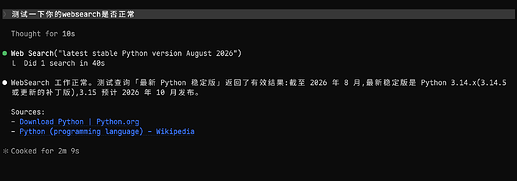
问题说在前面:
1.使用cpa转发有可能会被大善人gank!虽然目前并没有证据表明这一点,但行为特征终究和原生cc不一致
2.相关搜索请求因为带上一些常规工具可能会导致问题?目前我还没遇到这一点
下面是可用配置,最好修改一下models.name字段,不然把其他模型的也改了可能会出问题
目前可用配置```
payload:
override-raw:
- models:
- name: "*"
protocol: "claude"
match:
- "tools.0.type": "web_search_20250305"
not-exist:
- "tools.1"
params:
"tools": |-
[
{
"name": "Bash",
"description": "Executes a bash command and returns its output.\n\nThis tool runs Git Bash (POSIX sh), not cmd.exe or PowerShell. Use Unix",
"input_schema": {
"$schema": "https://json-schema.org/draft/2020-12/schema",
"type": "object",
"properties": {
"command": {
"description": "The command to execute",
"type": "string"
},
"timeout": {
"description": "Optional timeout in milliseconds (max 600000)",
"type": "number"
},
"description": {
"description": "Clear, concise description of what this command does in active voice. Never use words like \"complex\" or \"risk\" in the description - just describe what it does.\n\nFor simple commands (git, npm, standard CLI tools), keep it brief (5-10 words):\n- ls → \"List files in current directory\"\n- git status → \"Show working tree status\"\n- npm install → \"Install package dependencies\"\n\nFor commands that are harder to parse at a glance (piped commands, obscure flags, etc.), add enough context to clarify what it does:\n- find . -name \"*.tmp\" -exec rm {} \\; → \"Find and delete all .tmp files recursively\"\n- git reset --hard origin/main → \"Discard all local changes and match remote main\"\n- curl -s url | jq '.data[]' → \"Fetch JSON from URL and extract data array elements\"",
"type": "string"
},
"run_in_background": {
"description": "Set to true to run this command in the background.",
"type": "boolean"
},
"dangerouslyDisableSandbox": {
"description": "Set this to true to dangerously override sandbox mode and run commands without sandboxing.",
"type": "boolean"
}
},
"required": [
"command"
],
"additionalProperties": false
}
},
{
"name": "Read",
"description": "Reads a file from the local filesystem.\n\n-file_pathmust be an absolute path.\n- Reads up to 2000 lines by default.\n- ",
"input_schema": {
"$schema": "https://json-schema.org/draft/2020-12/schema",
"type": "object",
"properties": {
"file_path": {
"description": "The absolute path to the file to read",
"type": "string"
},
"offset": {
"description": "The line number to start reading from. Only provide if the file is too large to read at once",
"type": "integer",
"minimum": 0,
"maximum": 9007199254740991
},
"limit": {
"description": "The number of lines to read. Only provide if the file is too large to read at once.",
"type": "integer",
"exclusiveMinimum": 0,
"maximum": 9007199254740991
},
"pages": {
"description": "Page range for PDF files (e.g., \"1-5\", \"3\", \"10-20\"). Only applicable to PDF files. Maximum 20 pages per request.",
"type": "string"
}
},
"required": [
"file_path"
],
"additionalProperties": false
}
},
{
"name": "Edit",
"description": "Performs exact string replacement in a file.\n\n- You must Read the file in this conversation before editing, or the call ",
"input_schema": {
"$schema": "https://json-schema.org/draft/2020-12/schema",
"type": "object",
"properties": {
"file_path": {
"description": "The absolute path to the file to modify",
"type": "string"
},
"old_string": {
"description": "The text to replace",
"type": "string"
},
"new_string": {
"description": "The text to replace it with (must be different from old_string)",
"type": "string"
},
"replace_all": {
"description": "Replace all occurrences of old_string (default false)",
"default": false,
"type": "boolean"
}
},
"required": [
"file_path",
"old_string",
"new_string"
],
"additionalProperties": false
}
},
{
"name": "Write",
"description": "Writes a file to the local filesystem, overwriting if one exists.\n\nWhen to use: creating a new file, or fully replacing ",
"input_schema": {
"$schema": "https://json-schema.org/draft/2020-12/schema",
"type": "object",
"properties": {
"file_path": {
"description": "The absolute path to the file to write (must be absolute, not relative)",
"type": "string"
},
"content": {
"description": "The content to write to the file",
"type": "string"
}
},
"required": [
"file_path",
"content"
],
"additionalProperties": false
}
},
{
"name": "Glob",
"description": "Fast file pattern matching. Supports glob patterns like \"**/*.js\" or \"src/**/*.ts\". Returns matching file paths sorted b",
"input_schema": {
"$schema": "https://json-schema.org/draft/2020-12/schema",
"type": "object",
"properties": {
"pattern": {
"description": "The glob pattern to match files against",
"type": "string"
},
"path": {
"description": "The directory to search in. If not specified, the current working directory will be used. IMPORTANT: Omit this field to use the default directory. DO NOT enter \"undefined\" or \"null\" - simply omit it for the default behavior. Must be a valid directory path if provided.",
"type": "string"
}
},
"required": [
"pattern"
],
"additionalProperties": false
}
},
{
"name": "Grep",
"description": "Content search built on ripgrep. Prefer this overgrep/rgvia Bash — results integrate with the permission UI and fi",
"input_schema": {
"$schema": "https://json-schema.org/draft/2020-12/schema",
"type": "object",
"properties": {
"pattern": {
"description": "The regular expression pattern to search for in file contents",
"type": "string"
},
"path": {
"description": "File or directory to search in (rg PATH). Defaults to current working directory.",
"type": "string"
},
"glob": {
"description": "Glob pattern to filter files (e.g. \".js\", \".{ts,tsx}\") - maps to rg --glob",
"type": "string"
},
"output_mode": {
"description": "Output mode: \"content\" shows matching lines (supports -A/-B/-C context, -n line numbers, head_limit), \"files_with_matches\" shows file paths (supports head_limit), \"count\" shows match counts (supports head_limit). Defaults to \"files_with_matches\".",
"type": "string",
"enum": [
"content",
"files_with_matches",
"count"
]
},
"-B": {
"description": "Number of lines to show before each match (rg -B). Requires output_mode: \"content\", ignored otherwise.",
"type": "number"
},
"-A": {
"description": "Number of lines to show after each match (rg -A). Requires output_mode: \"content\", ignored otherwise.",
"type": "number"
},
"-C": {
"description": "Alias for context.",
"type": "number"
},
"context": {
"description": "Number of lines to show before and after each match (rg -C). Requires output_mode: \"content\", ignored otherwise.",
"type": "number"
},
"-n": {
"description": "Show line numbers in output (rg -n). Requires output_mode: \"content\", ignored otherwise. Defaults to true.",
"type": "boolean"
},
"-i": {
"description": "Case insensitive search (rg -i)",
"type": "boolean"
},
"-o": {
"description": "Print only the matched (non-empty) parts of each matching line, one match per output line (rg -o / --only-matching). Requires output_mode: \"content\", ignored otherwise. Defaults to false.",
"type": "boolean"
},
"type": {
"description": "File type to search (rg --type). Common types: js, py, rust, go, java, etc. More efficient than include for standard file types.",
"type": "string"
},
"head_limit": {
"description": "Limit output to first N lines/entries, equivalent to \"| head -N\". Works across all output modes: content (limits output lines), files_with_matches (limits file paths), count (limits count entries). Defaults to 250 when unspecified. Pass 0 for unlimited (use sparingly — large result sets waste context).",
"type": "number"
},
"offset": {
"description": "Skip first N lines/entries before applying head_limit, equivalent to \"| tail -n +N | head -N\". Works across all output modes. Defaults to 0.",
"type": "number"
},
"multiline": {
"description": "Enable multiline mode where . matches newlines and patterns can span lines (rg -U --multiline-dotall). Default: false.",
"type": "boolean"
}
},
"required": [
"pattern"
],
"additionalProperties": false
}
},
{
"type": "web_search_20250305",
"name": "web_search",
"max_uses": 8
}
]
- models:
- name: "*"
protocol: "claude"
match:
- "tools.0.type": "web_search_20260209"
not-exist:
- "tools.1"
params:
"tools": |-
[
{
"name": "Bash",
"description": "Executes a bash command and returns its output.\n\nThis tool runs Git Bash (POSIX sh), not cmd.exe or PowerShell. Use Unix",
"input_schema": {
"$schema": "https://json-schema.org/draft/2020-12/schema",
"type": "object",
"properties": {
"command": {
"description": "The command to execute",
"type": "string"
},
"timeout": {
"description": "Optional timeout in milliseconds (max 600000)",
"type": "number"
},
"description": {
"description": "Clear, concise description of what this command does in active voice. Never use words like \"complex\" or \"risk\" in the description - just describe what it does.\n\nFor simple commands (git, npm, standard CLI tools), keep it brief (5-10 words):\n- ls → \"List files in current directory\"\n- git status → \"Show working tree status\"\n- npm install → \"Install package dependencies\"\n\nFor commands that are harder to parse at a glance (piped commands, obscure flags, etc.), add enough context to clarify what it does:\n- find . -name \"*.tmp\" -exec rm {} \\; → \"Find and delete all .tmp files recursively\"\n- git reset --hard origin/main → \"Discard all local changes and match remote main\"\n- curl -s url | jq '.data[]' → \"Fetch JSON from URL and extract data array elements\"",
"type": "string"
},
"run_in_background": {
"description": "Set to true to run this command in the background.",
"type": "boolean"
},
"dangerouslyDisableSandbox": {
"description": "Set this to true to dangerously override sandbox mode and run commands without sandboxing.",
"type": "boolean"
}
},
"required": [
"command"
],
"additionalProperties": false
}
},
{
"name": "Read",
"description": "Reads a file from the local filesystem.\n\n-file_pathmust be an absolute path.\n- Reads up to 2000 lines by default.\n- ",
"input_schema": {
"$schema": "https://json-schema.org/draft/2020-12/schema",
"type": "object",
"properties": {
"file_path": {
"description": "The absolute path to the file to read",
"type": "string"
},
"offset": {
"description": "The line number to start reading from. Only provide if the file is too large to read at once",
"type": "integer",
"minimum": 0,
"maximum": 9007199254740991
},
"limit": {
"description": "The number of lines to read. Only provide if the file is too large to read at once.",
"type": "integer",
"exclusiveMinimum": 0,
"maximum": 9007199254740991
},
"pages": {
"description": "Page range for PDF files (e.g., \"1-5\", \"3\", \"10-20\"). Only applicable to PDF files. Maximum 20 pages per request.",
"type": "string"
}
},
"required": [
"file_path"
],
"additionalProperties": false
}
},
{
"name": "Edit",
"description": "Performs exact string replacement in a file.\n\n- You must Read the file in this conversation before editing, or the call ",
"input_schema": {
"$schema": "https://json-schema.org/draft/2020-12/schema",
"type": "object",
"properties": {
"file_path": {
"description": "The absolute path to the file to modify",
"type": "string"
},
"old_string": {
"description": "The text to replace",
"type": "string"
},
"new_string": {
"description": "The text to replace it with (must be different from old_string)",
"type": "string"
},
"replace_all": {
"description": "Replace all occurrences of old_string (default false)",
"default": false,
"type": "boolean"
}
},
"required": [
"file_path",
"old_string",
"new_string"
],
"additionalProperties": false
}
},
{
"name": "Write",
"description": "Writes a file to the local filesystem, overwriting if one exists.\n\nWhen to use: creating a new file, or fully replacing ",
"input_schema": {
"$schema": "https://json-schema.org/draft/2020-12/schema",
"type": "object",
"properties": {
"file_path": {
"description": "The absolute path to the file to write (must be absolute, not relative)",
"type": "string"
},
"content": {
"description": "The content to write to the file",
"type": "string"
}
},
"required": [
"file_path",
"content"
],
"additionalProperties": false
}
},
{
"name": "Glob",
"description": "Fast file pattern matching. Supports glob patterns like \"**/*.js\" or \"src/**/*.ts\". Returns matching file paths sorted b",
"input_schema": {
"$schema": "https://json-schema.org/draft/2020-12/schema",
"type": "object",
"properties": {
"pattern": {
"description": "The glob pattern to match files against",
"type": "string"
},
"path": {
"description": "The directory to search in. If not specified, the current working directory will be used. IMPORTANT: Omit this field to use the default directory. DO NOT enter \"undefined\" or \"null\" - simply omit it for the default behavior. Must be a valid directory path if provided.",
"type": "string"
}
},
"required": [
"pattern"
],
"additionalProperties": false
}
},
{
"name": "Grep",
"description": "Content search built on ripgrep. Prefer this overgrep/rgvia Bash — results integrate with the permission UI and fi",
"input_schema": {
"$schema": "https://json-schema.org/draft/2020-12/schema",
"type": "object",
"properties": {
"pattern": {
"description": "The regular expression pattern to search for in file contents",
"type": "string"
},
"path": {
"description": "File or directory to search in (rg PATH). Defaults to current working directory.",
"type": "string"
},
"glob": {
"description": "Glob pattern to filter files (e.g. \".js\", \".{ts,tsx}\") - maps to rg --glob",
"type": "string"
},
"output_mode": {
"description": "Output mode: \"content\" shows matching lines (supports -A/-B/-C context, -n line numbers, head_limit), \"files_with_matches\" shows file paths (supports head_limit), \"count\" shows match counts (supports head_limit). Defaults to \"files_with_matches\".",
"type": "string",
"enum": [
"content",
"files_with_matches",
"count"
]
},
"-B": {
"description": "Number of lines to show before each match (rg -B). Requires output_mode: \"content\", ignored otherwise.",
"type": "number"
},
"-A": {
"description": "Number of lines to show after each match (rg -A). Requires output_mode: \"content\", ignored otherwise.",
"type": "number"
},
"-C": {
"description": "Alias for context.",
"type": "number"
},
"context": {
"description": "Number of lines to show before and after each match (rg -C). Requires output_mode: \"content\", ignored otherwise.",
"type": "number"
},
"-n": {
"description": "Show line numbers in output (rg -n). Requires output_mode: \"content\", ignored otherwise. Defaults to true.",
"type": "boolean"
},
"-i": {
"description": "Case insensitive search (rg -i)",
"type": "boolean"
},
"-o": {
"description": "Print only the matched (non-empty) parts of each matching line, one match per output line (rg -o / --only-matching). Requires output_mode: \"content\", ignored otherwise. Defaults to false.",
"type": "boolean"
},
"type": {
"description": "File type to search (rg --type). Common types: js, py, rust, go, java, etc. More efficient than include for standard file types.",
"type": "string"
},
"head_limit": {
"description": "Limit output to first N lines/entries, equivalent to \"| head -N\". Works across all output modes: content (limits output lines), files_with_matches (limits file paths), count (limits count entries). Defaults to 250 when unspecified. Pass 0 for unlimited (use sparingly — large result sets waste context).",
"type": "number"
},
"offset": {
"description": "Skip first N lines/entries before applying head_limit, equivalent to \"| tail -n +N | head -N\". Works across all output modes. Defaults to 0.",
"type": "number"
},
"multiline": {
"description": "Enable multiline mode where . matches newlines and patterns can span lines (rg -U --multiline-dotall). Default: false.",
"type": "boolean"
}
},
"required": [
"pattern"
],
"additionalProperties": false
}
},
{
"type": "web_search_20260209",
"name": "web_search",
"max_uses": 8
}
]
```至于子代理和webfetch的问题,直接把haiku模型配置成其他的国模就行了,any的haiku最近一直不可用,而webfetch是会把网页交给haiku模型进行总结处理的,所以导致不可用主楼 - Aydenx2026-08-02
配个MCP就好了,没必要这么麻烦
- Chinamobile2026-08-02
不知道为什么,我用他的Claude系列模型,只要读图就会卡死,首字200s然后API error
- HUME2026-08-02
佬,用什么mcp,能具体说说么,
- Aydenx2026-08-02
你就在站里搜索,有佬做过测评,根据你自己的需求选用就行
- 酒寄彩叶2026-08-02
提供一个思路,毕竟我本人也确实不用自带的websearch,用的是站里一个佬的smartsearch ^-^
- 星塔旅人2026-08-02
我是直接在cc用any,不走别的中转。search和fetch直接用plugin,比如exa tavily firecrawl
- 劳资蜀道山2026-08-05
我的any 两个地址都用了,
cc提示:Please run /login · API Error: 403 {“RequestId”:“1-6a7351ba-162d2c-e21da0b01c1e”,“Code”:“AccessDenied”,“Message”:“Current user is in debt.”}
codex中提示:unexpected status 403 Forbidden: {“RequestId”:“1-6a7351e8-162d2c-4697a90b30c1”,“Code”:“AccessDenied”,“Message”:“Current user is in debt.”}, url:
https://a-ocnfniawgw.cn-shanghai.fcapp.run/v1/responses
是不是一定要梯子才行。