- wilsons2026-08-08
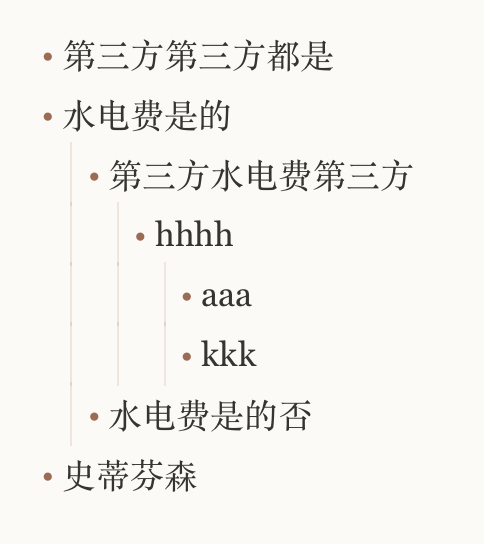
就比如下面这种,无序列表的背景线问题(有序列表和任务列表也一样),这个问题碰到过很多次,每次GPT都会把这个背景线搞乱,而且无论怎么让它改,它总是改不对。
但这时候我不得不请出Claude,无论是以前的Claude 4.6到现在的Fable 5都能解决这个问题,而且一次性能解决,但是GPT无论如何都解决不了。
不知道大家有没有遇到过这个问题?
PS:
现在感觉,现在有时候感觉大模型就是一个掌握了武林秘籍的傻子。你要想用好它,你就得事无巨细地告诉它。比如说,你要告诉它,去哪打?打谁?怎样打?什么时候打?如何打?如何收。否则它可能乱打一气,见人就打。
甚至更搞笑的是,有时候同时多个项目。比如说,一个A项目,一个B项目。你这个提示词本来给B项目用的,结果你不小心复制错了,放到了A项目里面。按理说,你这个提示词和A项目完全不相关,AI它应该表示质疑,或者提出疑问,让你来确认。然而并没有,它照样改得不亦乐乎。显而易见,错误的提示词有时候就会把你的项目搞乱。
还有时候,明明很简单的就能搞定的,比如说if加个条件就能搞定的,他非给你扯一篇一篇长篇大论,甚至搞这样设计那样设计。然后你最终告诉他if这样加就行了。有时候会想到底是他在帮我,还是我在帮他?
所以有时候,碰到他很傻的时候,你会生气,甚至感觉心累。不知道大家有没有这种感觉?
当然,不得不承认,有时候它还是很聪明的,就是你要多花心思,有耐心,它就能做出漂亮的结果(比自己强多了)。所以用AI有时候也没那么轻松。
你怎么看?
主楼 - yuwk2026-08-08
佬 上面那张图的样式是啥,能分享下吗^-^
- wilsons2026-08-08
这是我做的一个笔记里边的,它是整体集成的,等会我要是调试的时候,我看一下能不能单独提取出来吧。
- 远坂凛的宠物2026-08-08
gpt就是个高智商精神病沙子,给它把水倒好乐奏起摇扇子,它会瘫坐在核弹上表现出使椅子爆炸的上限,然后被到处吹。
大部分时候这东西听不懂人话,钻牛角尖,自以为是,专注细枝末节地摸鱼,不是好不好用的问题,而是可不可用的问题 ^-^
- wilsons2026-08-14
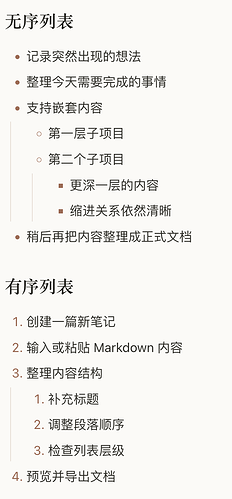
我让AI从项目中提取出来了一个演示文档,仅供参考:```
<!doctype html>
<html lang="zh-CN">
<head>
<meta charset="utf-8">
<meta name="viewport" content="width=device-width, initial-scale=1">
<title>Quick Notes 列表样式演示</title><style>
:root {
color-scheme: light;--ink: #20201d;
--muted: #77766f;
--line: #deddd6;
--paper: #fbfaf6;
--surface: #f9f8f3;
--accent: #d9673f;
--accent-dark: #a74527;
--editor-ink: #35342f;
--editor-selection: #e4d8c6;
--selection-ink: #20201d;
--list-marker: #9b6b55;
--list-guide: rgba(155, 107, 85, 0.18);
}:root[data-theme="dark"] {
color-scheme: dark;--ink: #e9e5dc;
--muted: #aaa49a;
--line: #45413b;
--paper: #211f1c;
--surface: #2b2925;
--accent: #e07852;
--accent-dark: #f0926f;
--editor-ink: #ded9cf;
--editor-selection: #65483b;
--selection-ink: #fffaf2;
--list-marker: #c48d74;
--list-guide: rgba(196, 141, 116, 0.24);
}- {
box-sizing: border-box;
}::selection {
color: var(--selection-ink);
background: var(--editor-selection);
}html,
body {
margin: 0;
min-height: 100%;
}body {
padding: 48px 24px;
color: var(--ink);
background: var(--paper);
font-family:
-apple-system,
BlinkMacSystemFont,
"PingFang SC",
"Helvetica Neue",
sans-serif;
-webkit-font-smoothing: antialiased;
}.demo {
width: min(760px, 100%);
margin: 0 auto;
}.demo-header {
display: flex;
align-items: flex-start;
justify-content: space-between;
gap: 24px;
margin-bottom: 34px;
padding-bottom: 18px;
border-bottom: 1px solid var(--line);
}.eyebrow {
display: block;
margin-bottom: 5px;
color: var(--accent-dark);
font: 700 10px/1.2 ui-monospace, SFMono-Regular, Menlo, monospace;
letter-spacing: 0.16em;
}h1,
h2 {
margin: 0;
color: var(--ink);
font-family: Georgia, "Songti SC", serif;
font-weight: 600;
}h1 {
font-size: 30px;
letter-spacing: -0.03em;
}h2 {
margin-bottom: 0.75em;
font-size: 1.35em;
line-height: 1.3;
}.subtitle {
margin: 8px 0 0;
color: var(--muted);
font-size: 13px;
line-height: 1.6;
}.theme-button {
flex: 0 0 auto;
min-width: 88px;
height: 34px;
padding: 0 12px;
color: var(--ink);
border: 1px solid var(--line);
border-radius: 8px;
background: var(--surface);
font: inherit;
font-size: 12px;
cursor: pointer;
}.theme-button:hover {
border-color: var(--muted);
}.theme-button:focus-visible {
outline: 2px solid var(--accent);
outline-offset: 2px;
}.preview {
color: var(--editor-ink);
font-size: 15px;
line-height: 1.78;
}.example {
margin-bottom: 32px;
}/*
* Quick Notes Markdown 预览中的列表基础样式。
*/.preview ul,
.preview ol {
margin: 0 0 1em;
padding-left: 1.7em;
}.preview li {
position: relative;
}.preview li + li {
margin-top: 0.24em;
}/*
* Quick Notes 编辑器实时预览使用 --list-marker
* 为圆点和有序列表序号着色。
*/.preview li::marker {
color: var(--list-marker);
font-variant-numeric: tabular-nums;
}/*
* 嵌套列表。
*
* 引导线向左移动到父级列表标记的中心轴线上,
* 不再画在子列表圆点或数字的右侧。
*/.preview .nested-list {
position: relative;
margin-top: 0.24em;
margin-bottom: 0;
}.preview .nested-list::before {
content: "";
position: absolute;
top: 0;
bottom: 0;
left: -1.28em;
width: 1px;
background: var(--list-guide);
pointer-events: none;
}/*
* 任务列表。
*/.preview .task-list {
list-style: none;
}.preview .task-list input[type="checkbox"] {
width: 15px;
height: 15px;
margin: 0 7px 0 -1.35em;
vertical-align: -2px;
accent-color: var(--accent);
cursor: pointer;
}/*
* 任务列表中的 checkbox 是实际元素,不是 ::marker,
* 所以引导线位置需要略微单独校正。
*/.preview .task-list.nested-list::before {
left: -1.22em;
}.preview .task-list li:has(> input[type="checkbox"]:checked) {
color: var(--muted);
}.preview .task-list li:has(> input[type="checkbox"]:checked) > span {
text-decoration: line-through;
text-decoration-color: color-mix(
in srgb,
var(--muted) 58%,
transparent
);
}
</style>
</head><body>
<main class="demo">
<header class="demo-header">
<div>
<span class="eyebrow">QUICK NOTES</span>
<h1>列表样式演示</h1>
<p class="subtitle">有序列表、无序列表与任务列表</p>
</div><button
id="themeButton"
class="theme-button"
type="button"
aria-label="切换明暗主题"深色主题
</button>
</header><article class="preview">
<section class="example">
<h2>无序列表</h2><ul>
<li>记录突然出现的想法</li>
<li>整理今天需要完成的事情</li>
<li>
支持嵌套内容<ul class="nested-list">
<li>第一层子项目</li>
<li>
第二个子项目<ul class="nested-list">
<li>更深一层的内容</li>
<li>缩进关系依然清晰</li>
</ul>
</li>
</ul>
</li>
<li>稍后再把内容整理成正式文档</li>
</ul>
</section><section class="example">
<h2>有序列表</h2><ol>
<li>创建一篇新笔记</li>
<li>输入或粘贴 Markdown 内容</li>
<li>
整理内容结构<ol class="nested-list">
<li>补充标题</li>
<li>调整段落顺序</li>
<li>检查列表层级</li>
</ol>
</li>
<li>预览并导出文档</li>
</ol>
</section><section class="example">
<h2>任务列表</h2><ul class="task-list">
<li>
<input id="task-meeting" type="checkbox">
<label for="task-meeting">
整理今天的会议记录
</label>
</li><li>
<input id="task-email" type="checkbox" checked>
<label for="task-email">
回复重要邮件
</label>
</li><li>
<input id="task-list-style" type="checkbox">
<label for="task-list-style">
完善 Quick Notes 的列表样式
</label><ul class="task-list nested-list">
<li>
<input id="task-indent" type="checkbox" checked>
<label for="task-indent">
调整列表缩进
</label>
</li><li>
<input id="task-state" type="checkbox">
<label for="task-state">
检查任务列表状态
</label>
</li><li>
<input id="task-theme" type="checkbox">
<label for="task-theme">
验证明暗主题颜色
</label>
</li>
</ul>
</li><li>
<input id="task-export" type="checkbox">
<label for="task-export">
导出演示页面
</label>
</li>
</ul>
</section><section class="example">
<h2>混合列表</h2><ol>
<li>
准备阶段<ul class="nested-list">
<li>收集资料</li>
<li>确定文档结构</li>
</ul>
</li><li>
执行阶段<ul class="task-list nested-list">
<li>
<input id="task-draft" type="checkbox" checked>
<label for="task-draft">
完成初稿
</label>
</li><li>
<input id="task-proofread" type="checkbox">
<label for="task-proofread">
校对内容
</label>
</li>
</ul>
</li><li>发布最终版本</li>
</ol>
</section>
</article>
</main><script>
const root = document.documentElement;
const button = document.getElementById("themeButton");button.addEventListener("click", () => {
const nextTheme =
root.dataset.theme === "dark" ? "light" : "dark";root.dataset.theme = nextTheme;
button.textContent =
nextTheme === "dark" ? "浅色主题" : "深色主题";
});
</script>
</body>
</html>
```完整源码见 QuickNotes:搓了个 Obsidian 风格的笔记,主打轻量快捷 的style.css文件 - Rains2026-08-14
现在prompt得像法律文书那样写,许愿还是不行的。特别是gpt,这是他的一贯风格