- 神奇的哆啦z梦2025-11-21
如果你的静态博客使用了 Giscus 作为评论系统,那么所有评论内容实际上都会存储在你对应仓库的 GitHub Discussions 中。
这种方式免去了自建数据库和后端的麻烦,但很多人会关心一个问题:能否把评论备份导出?
答案是:可以!因为 GitHub 提供了完整的 API 来读取 Discussions 的全部数据。下面是一份 python 脚本,可以一键导出 Discussions 的数据成 json 格式。
准备工作:
脚本放在最下方,我们先需要得到几个关键数据:
前三者很好得到,暂不提,分类 ID 可以在之前部署 Giscus 看到,也就是
data-category-id的值。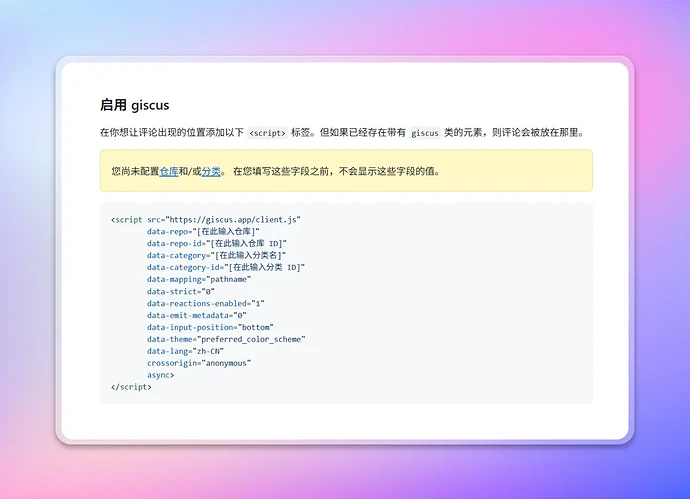
开始爬取
在本地新建一个
export_giscus.py文件,复制下面的代码进去,然后将这几个信息都填到配置中,最后在终端执行python export_giscus.py。程序会生成一个
.json文件,里面就是所有的 Giscus 评论数据。```
import requests
import json配置
GITHUB_TOKEN = "YOUR_GITHUB_TOKEN" # 填你的 token
REPO_OWNER = "your_owner" # 仓库 owner
REPO_NAME = "your_repo" # 仓库名
CATEGORY_ID = "your_category_id" # 绑定 giscus 的 Discussion 分类 IDGraphQL Endpoint
API_URL = "https://api.github.com/graphql"
HEADERS = {"Authorization": f"Bearer {GITHUB_TOKEN}"}
def run_query(query, variables=None):
r = requests.post(API_URL, headers=HEADERS, json={'query': query, 'variables': variables})
if r.status_code != 200:
raise Exception(f"Query failed with status code {r.status_code}: {r.text}")
return r.json()
def export_discussions():
discussions_data = []
has_next_page = True
end_cursor = None
query = """
query($owner:String!, $name:String!, $categoryId:ID!, $after:String) {
repository(owner: $owner, name: $name) {
discussions(first: 50, categoryId: $categoryId, after: $after) {
nodes {
id
title
url
createdAt
author { login, url }
body
comments(first: 100) {
nodes {
id
createdAt
author { login, url }
body
}
}
}
pageInfo {
endCursor
hasNextPage
}
}
}
}
"""
while has_next_page:
variables = {
"owner": REPO_OWNER,
"name": REPO_NAME,
"categoryId": CATEGORY_ID,
"after": end_cursor
}
result = run_query(query, variables)
repo_data = result["data"]["repository"]["discussions"]
for discussion in repo_data["nodes"]:
discussions_data.append(discussion)
end_cursor = repo_data["pageInfo"]["endCursor"]
has_next_page = repo_data["pageInfo"]["hasNextPage"]
with open(f"{REPO_OWNER}-{REPO_NAME}-giscus.json", "w", encoding="utf-8") as f:
json.dump(discussions_data, f, ensure_ascii=False, indent=2)
print(f"导出完成,共 {len(discussions_data)} 个 Discussion,保存到 {REPO_OWNER}-{REPO_NAME}-giscus.json")
if __name__ == "__main__":
export_discussions()这是一个从 https://zishu.me/blog/export-github-discussions-giscus-data.html 下的原始话题分离的讨论话题主楼 - aliom14小时前
太强啦 支持大佬
 xuhuo14小时前
围观大佬一下
- 黎14小时前
围观大佬一下
- 章魚猫14小时前
只能爬取第一级的评论,嵌套的多级评论爬不下来。
- naive14小时前
????那个问个问题???构建博客的时候为啥不顺便把内容输出位md格式?
- 神奇的哆啦z梦14小时前
- naive14小时前
正常不是action提取giscus的数据到hugo或者hexo的内容目录吗?这些内容不就是已经提取的内容吗
- 神奇的哆啦z梦14小时前
- naive14小时前
嗷嗷嗷,那是我孤陋寡闻了我之前也想用这个写的,但是因为github速度原因,后台我放notion了
- lijiuju14小时前
- Jerome°14小时前
太强了,支持大佬
- cardelle00914小时前
有用谢谢
- xiyu14小时前
太强了,跟着学了一遍,竟然失败了
- 神奇的哆啦z梦14小时前
卡在哪个地方了,我可以给你参考一下
- Waiting14小时前
大力支持,感谢楼主
- wwn14小时前
学到了新知识,感谢
- fuckthefuckingworld14小时前
怎么那么多子舒的博客啊,舒服吗 ?
- 神奇的哆啦z梦14小时前
论坛爬虫自动生成的