- Eker2026-08-21
本帖使用社区开源推广,符合推广要求。我申明并遵循社区要求的以下内容:
- 我的帖子已经打上 开源推广 标签: 是
- 我的开源项目完整开源,无未开源部分: 是
- 我的开源项目已链接认可 LINUX DO 社区: 是
- 我帖子内的项目介绍,AI生成、润色内容部分已截图发出: 是
- 以上选择我承诺是永久有效的,接受社区和佬友监督: 是
以下为项目介绍正文内容,AI生成、润色内容已使用截图方式发出

参考github上一个仿照grokbot 的小球表情,做了一个DeepSeek-Harness 的插件
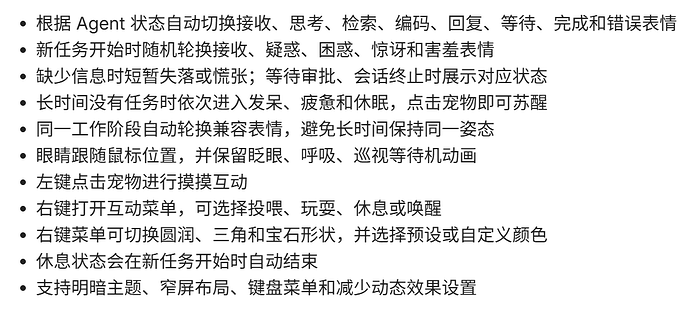
功能:
功能列表为AI读取代码生成:
开源地址:
github.com
GitHub - cpt-kenvie/EmotionPet
通过在 GitHub 上创建帐户来为 cpt-kenvie/EmotionPet 开发做出贡献。
表情来源:emotion ball
使用方法:
因为没满24小时,所以要用以下命令安装最新版```
dsh plugin --profile web add dsh-emotion-pet@latest --config.minimum-release-age=0
``将插件安装到默认 Web Profile:``
dsh plugin --profile web add dsh-emotion-pet
``启动 DeepSeek Harness Web:``
dsh web
``终端显示dsh web:` 地址后,在浏览器中打开该地址。宠物会出现在会话输入框正上方。主楼 - MWBDTTH2026-08-21
看着有点意思,实装上去看看啥效果
- Eker2026-08-21
嘻嘻,遇到啥问题,可以说一下,欢迎反馈
- Eker2026-08-21
佬重新安装一下,可能安装的不是最新版```
dsh plugin --profile web remove dsh-emotion-pet
dsh plugin --profile web add dsh-emotion-pet@latest --config.minimum-release-age=0