- Coeeshu5天前
@echo off rem ========================================================================== rem PCL download-limit unlocker (patches Plain Craft Launcher 2.exe in place) rem rem What it does: rem The launcher hides Minecraft downloads behind the compile-time constant rem "RestrictMcDownload". This script rewrites the tiny IL method rem PCL.PageDownloadInstall::LoaderInit so the download page uses the real rem version-list loader (PCL.ModDownload::DlClientListLoader) instead of the rem "download disabled" loader that always throws. rem rem How to use: rem Put this .bat next to "Plain Craft Launcher 2.exe" and double-click it, rem or drag the exe onto this .bat. A backup (*.bak_yyyyMMdd_HHmmss) is made rem before the exe is modified. rem rem Option: --no-pause do not wait for a key press when finished. rem ========================================================================== setlocal EnableExtensions set "BATFILE=%~f0" set "PSFILE=%TEMP%\pcl_unlock_mcdl_%RANDOM%%RANDOM%.ps1" powershell.exe -NoProfile -ExecutionPolicy Bypass -Command "$bytes=[IO.File]::ReadAllBytes($env:BATFILE);$u=New-Object Text.UTF8Encoding($false,$true);try{$b=$u.GetString($bytes)}catch{$b=[Text.Encoding]::GetEncoding(936).GetString($bytes)};$m='#@@PCL_UNLOCK_PS_BEGIN@@#';$i=$b.LastIndexOf($m);if($i -lt 0){exit 9};$c=$b.Substring($i+$m.Length).TrimStart([char[]](13,10));[IO.File]::WriteAllText($env:PSFILE,$c,(New-Object Text.UTF8Encoding($true)))" if errorlevel 1 ( echo. echo [ERROR] Failed to prepare the patch script. Windows PowerShell is required. pause exit /b 1 ) powershell.exe -NoProfile -ExecutionPolicy Bypass -File "%PSFILE%" -BatDir "%~dp0." -CurrentDir "%CD%" -Target "%~1" set "RC=%ERRORLEVEL%" del /f /q "%PSFILE%" >nul 2>&1 echo. if /i "%~1"=="--no-pause" exit /b %RC% pause exit /b %RC% #@@PCL_UNLOCK_PS_BEGIN@@# # ========================================================================== # PCL 下载限制解除补丁:直接修改 Plain Craft Launcher 2.exe # # 原理:开源版编译时 RestrictMcDownload=True 被编译器折叠,下载页的 # LoaderInit 被替换成“关闭下载”的 LoaderTask(一运行就抛异常)。 # 本脚本把该方法体改回使用真正的版本列表加载器 # PCL.ModDownload::DlClientListLoader,其它代码一律不动。 # # 用法:把 .bat 放到 exe 同目录双击,或把 exe 拖到 .bat 上。 # 修改前自动备份;重复运行是安全的。 # ========================================================================== param( [string]$BatDir = '', [string]$CurrentDir = '', [string]$Target = '' ) $ErrorActionPreference = 'Stop' # 输出被重定向(管道/文件)时改用 UTF-8,避免中文乱码 if ([Console]::IsOutputRedirected) { try { [Console]::OutputEncoding = New-Object System.Text.UTF8Encoding($false) } catch { } } $script:ExeName = 'Plain Craft Launcher 2.exe' $script:Steps = 5 $script:MethodFlags = [Reflection.BindingFlags]'Public,NonPublic,Instance,Static,DeclaredOnly' function Write-Step { param([int]$Number, [string]$Text) Write-Host (' [{0}/{1}] {2}' -f $Number, $script:Steps, $Text) -ForegroundColor Yellow } function Write-Detail { param([string]$Text) Write-Host (' ' + $Text) -ForegroundColor Gray } function Write-Fail { param([string]$Text) Write-Host '' Write-Host (' [失败] ' + $Text) -ForegroundColor Red } function Resolve-ExePath { param([string]$Target, [string[]]$Dirs) $found = New-Object System.Collections.ArrayList if (-not [string]::IsNullOrWhiteSpace($Target)) { if (Test-Path -LiteralPath $Target -PathType Leaf) { $full = [IO.Path]::GetFullPath($Target) if ([IO.Path]::GetExtension($full) -ieq '.exe') { [void]$found.Add($full) } } } foreach ($dir in $Dirs) { if ([string]::IsNullOrWhiteSpace($dir)) { continue } if (-not (Test-Path -LiteralPath $dir -PathType Container)) { continue } $exact = Join-Path $dir $script:ExeName if (Test-Path -LiteralPath $exact -PathType Leaf) { [void]$found.Add((Resolve-Path -LiteralPath $exact).Path) continue } $alt = Get-ChildItem -LiteralPath $dir -Filter '*Craft Launcher*.exe' -File -ErrorAction SilentlyContinue | Select-Object -First 1 if ($alt) { [void]$found.Add($alt.FullName) } } if ($found.Count -eq 0) { return $null } return $found[0] } function Get-PclInfo { param([byte[]]$Bytes) $asm = [Reflection.Assembly]::Load($Bytes) $type = $asm.GetType('PCL.PageDownloadInstall', $false) if ($null -eq $type) { throw '找不到 PCL.PageDownloadInstall 类型,这可能不是 PCL 主程序。' } $method = $type.GetMethod('LoaderInit', $script:MethodFlags) if ($null -eq $method) { throw '找不到 LoaderInit 方法,exe 版本不受支持。' } $modDownload = $asm.GetType('PCL.ModDownload', $false) if ($null -eq $modDownload) { throw '找不到 PCL.ModDownload 类型,exe 版本不受支持。' } $field = $modDownload.GetField('DlClientListLoader', [Reflection.BindingFlags]'Public,Static') if ($null -eq $field) { throw '找不到 DlClientListLoader 字段,exe 版本不受支持。' } return [pscustomobject]@{ Assembly = $asm Type = $type Method = $method IL = $method.GetMethodBody().GetILAsByteArray() Token = $field.MetadataToken } } function Test-RestrictedIL { param([byte[]]$IL) return ( $IL.Length -eq 94 -and $IL[0x19] -eq 0x14 -and # ldnull $IL[0x1A] -eq 0x72 -and # ldstr "关闭下载" $IL[0x1F] -eq 0x7E -and # ldsfld <closure> $IL[0x4A] -eq 0x02 -and # ldarg.0 $IL[93] -eq 0x2A # ret ) } function Test-UnlockedIL { param([byte[]]$IL, [int]$Token) if ($IL.Length -lt 0x20) { return $false } if ($IL[0x1A] -ne 0x7E) { return $false } return ([BitConverter]::ToInt32($IL, 0x1B) -eq $Token) } function New-Backup { param([string]$Path) $stamp = Get-Date -Format 'yyyyMMdd_HHmmss' $bak = ('{0}.bak_{1}' -f $Path, $stamp) $n = 1 while (Test-Path -LiteralPath $bak) { $bak = ('{0}.bak_{1}_{2}' -f $Path, $stamp, $n) $n++ } Copy-Item -LiteralPath $Path -Destination $bak -Force return $bak } function Restore-Backup { param([string]$Path, [string]$Backup) try { Copy-Item -LiteralPath $Backup -Destination $Path -Force return $true } catch { return $false } } try { Write-Host '' Write-Host ' ==============================================================' -ForegroundColor Cyan Write-Host ' PCL 下载限制解除(直接修改 Plain Craft Launcher 2.exe)' -ForegroundColor Cyan Write-Host ' ==============================================================' -ForegroundColor Cyan Write-Host '' # ---------- 1. 定位 exe ---------- Write-Step 1 '正在定位 Plain Craft Launcher 2.exe ...' $exePath = Resolve-ExePath -Target $Target -Dirs @($BatDir, $CurrentDir, (Get-Location).Path) if (-not $exePath) { Write-Fail '没有找到 Plain Craft Launcher 2.exe。' Write-Host ' 请把本脚本放到 PCL 所在文件夹后运行,或把 exe 拖到本脚本上。' -ForegroundColor Gray exit 1 } Write-Detail ('程序路径:' + $exePath) $fileSize = (Get-Item -LiteralPath $exePath -Force).Length # ---------- 2. 分析程序 ---------- Write-Step 2 '正在分析程序版本 ...' $bytes = [IO.File]::ReadAllBytes($exePath) try { $info = Get-PclInfo -Bytes $bytes } catch { Write-Fail $_.Exception.Message Write-Host ' 本工具只支持 PCL 2.x 的 .NET 版 Plain Craft Launcher 2.exe。' -ForegroundColor Gray exit 1 } Write-Detail ('版本:' + $info.Assembly.GetName().Version + ',文件大小:' + $fileSize + ' 字节') if (Test-UnlockedIL -IL $info.IL -Token $info.Token) { Write-Host '' Write-Host ' 这个 exe 已经解除过下载限制,无需重复修改。' -ForegroundColor Green Write-Detail '如需还原:用同目录下的 *.bak_* 备份文件覆盖回来即可。' exit 0 } if (-not (Test-RestrictedIL -IL $info.IL)) { Write-Fail '没有找到预期的“关闭下载”代码,这个 exe 版本暂不支持。' Write-Detail ('LoaderInit 长度:' + $info.IL.Length + ' 字节(预期 94)') exit 1 } # ---------- 3. 备份 ---------- Write-Step 3 '正在备份原程序 ...' $backupPath = New-Backup -Path $exePath Write-Detail ('备份:' + $backupPath) # ---------- 4. 修改 ---------- Write-Step 4 '正在写入补丁 ...' Write-Detail 'LoaderInit:限制加载器 -> DlClientListLoader' $latin1 = [Text.Encoding]::GetEncoding(28591) $haystack = $latin1.GetString($bytes) $needle = $latin1.GetString($info.IL) $ilOffset = $haystack.IndexOf($needle, [StringComparison]::Ordinal) if ($ilOffset -lt 0) { Write-Fail '在 exe 文件里找不到 LoaderInit 的代码,已放弃修改。' exit 1 } if ($haystack.IndexOf($needle, $ilOffset + 1, [StringComparison]::Ordinal) -ge 0) { Write-Fail '文件中匹配到多处相同代码,为避免误改已停止。' exit 1 } $patchedIL = [byte[]]$info.IL.Clone() $patchedIL[0x1A] = 0x7E [Array]::Copy([BitConverter]::GetBytes($info.Token), 0, $patchedIL, 0x1B, 4) for ($i = 0x1F; $i -lt 0x4A; $i++) { $patchedIL[$i] = 0x00 } $patchOffset = $ilOffset + 0x1A for ($i = 0; $i -lt 48; $i++) { $bytes[$patchOffset + $i] = $patchedIL[0x1A + $i] } $item = Get-Item -LiteralPath $exePath -Force $wasReadOnly = $item.IsReadOnly if ($wasReadOnly) { $item.IsReadOnly = $false } try { [IO.File]::WriteAllBytes($exePath, $bytes) } catch { if ($wasReadOnly) { try { (Get-Item -LiteralPath $exePath -Force).IsReadOnly = $true } catch { } } [void](Restore-Backup -Path $exePath -Backup $backupPath) Write-Fail '写入失败,请先完全退出 PCL(包括托盘图标)后重试。' Write-Host (' ' + $_.Exception.Message) -ForegroundColor DarkGray exit 1 } finally { if ($wasReadOnly) { try { (Get-Item -LiteralPath $exePath -Force).IsReadOnly = $true } catch { } } } # ---------- 5. 校验 ---------- Write-Step 5 '正在校验修改结果 ...' $verify = Get-PclInfo -Bytes ([IO.File]::ReadAllBytes($exePath)) if (-not (Test-UnlockedIL -IL $verify.IL -Token $verify.Token)) { [void](Restore-Backup -Path $exePath -Backup $backupPath) Write-Fail '写入后的校验没有通过,已自动还原为原程序。' exit 1 } try { [Runtime.CompilerServices.RuntimeHelpers]::PrepareMethod($verify.Method.MethodHandle) } catch { [void](Restore-Backup -Path $exePath -Backup $backupPath) Write-Fail '补丁后的代码无法通过编译,已自动还原为原程序。' Write-Host (' ' + $_.Exception.Message) -ForegroundColor DarkGray exit 1 } Write-Detail '校验通过:代码可正常编译,下载加载 ```存成`.bat` bat脚本要和`Plain Craft Launcher 2.exe`放在同一个文件夹 运行bat即可 原理: 更换PCL内版本列表加载器 脚本bat本体: PCL解除下载限制.zip (4.6 KB) 实测 2026-10-20T12:24:00Z 最新版的 **2.99.0.0** PCL2 可以解除下载限制 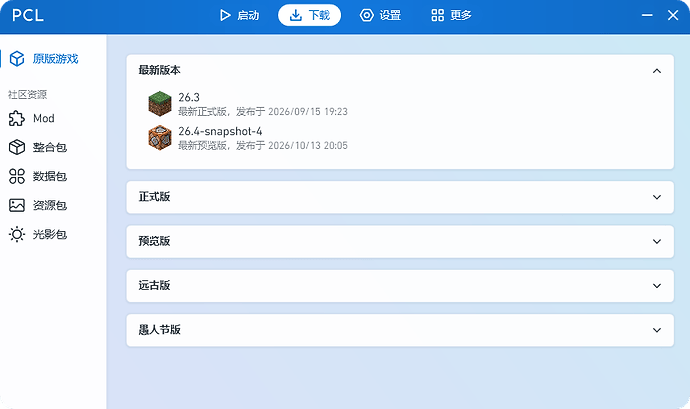主楼 - 深入交流5天前
还以为发码了,第一个进来了。
- 162010101015天前
没想到刚刷到被举报、修复方案就来了、感谢佬友 ^-^
很久没打开mc了,这是改了pcl2啥功能,我记得pcl2没啥大限制啊 ^-^
- alicemiff5天前
被举报了、后续不再提供下载功能了