帖子
- UEFI2026-06-09
github.com

GitHub - DEEIX-AI/DEEIX-Chat: An enterprise AI workspace for model routing,...
An enterprise AI workspace for model routing, multimodal chat, files, tools, billing, identity, and operations.
DEEIX Chat 是一款全新的高性能、高颜值、低占用的 AI 对话平台,可自托管部署,最低仅需 64MB 内存!
配置的位置在
管理员页面-模型-编辑模型,支持可视化和高级 JSON,下面会直接给到我的高级 JSON,粘贴进去后,可以进入可视化配置二次编辑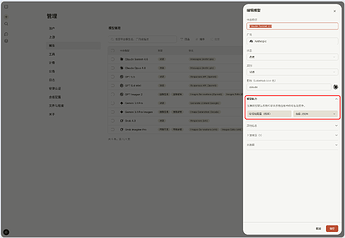
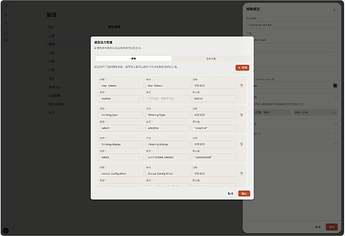
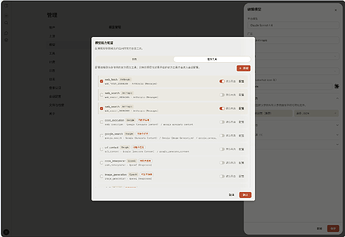
Claude 系列
增加输出长度、思考、缓存和工具调用的配置;用户界面预览如下
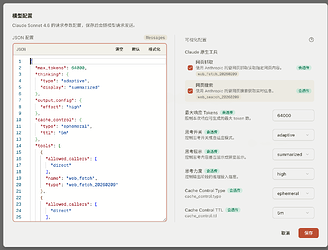
配置JSON内容```
{
"defaultOptions": {
"max_tokens": 64000,
"thinking": {
"type": "adaptive",
"display": "summarized"
},
"output_config": {
"effort": "high"
},
"cache_control": {
"type": "ephemeral",
"ttl": "5m"
}
},
"optionControls": [
{
"path": "max_tokens",
"type": "number",
"label": "Max Tokens"
},
{
"path": "thinking.type",
"type": "select",
"label": "Thinking Type",
"options": [
"adaptive"
]
},
{
"path": "thinking.display",
"type": "select",
"label": "Thinking Display",
"options": [
"summarized",
"omitted"
]
},
{
"path": "output_config.effort",
"type": "select",
"label": "Output Config Effort",
"options": [
"low",
"medium",
"high",
"xhigh",
"max"
]
},
{
"path": "cache_control.type",
"type": "select",
"label": "Cache Control Type",
"options": [
"ephemeral"
]
},
{
"path": "cache_control.ttl",
"type": "select",
"label": "Cache Control TTL",
"options": [
"5m",
"1h"
]
}
],
"nativeTools": [
{
"key": "anthropic.web_fetch_20260209",
"protocols": [
"anthropic_messages"
],
"label": "Web Fetch",
"enabled": true,
"defaultEnabled": true,
"payload": {
"allowed_callers": [
"direct"
],
"name": "web_fetch",
"type": "web_fetch_20260209"
},
"provider": "Anthropic",
"type": "web_fetch_20260209",
"description": "Anthropic hosted web fetch tool."
},
{
"key": "anthropic.web_search_20260209",
"protocols": [
"anthropic_messages"
],
"label": "Web Search",
"enabled": true,
"defaultEnabled": true,
"payload": {
"allowed_callers": [
"direct"
],
"name": "web_search",
"type": "web_search_20260209"
},
"provider": "Anthropic",
"type": "web_search_20260209",
"description": "Anthropic hosted web search tool."
}
]
}
```OpenAI 系列增加思考、输出详细程度、数据存储、工具调用的配置;用户界面预览如下
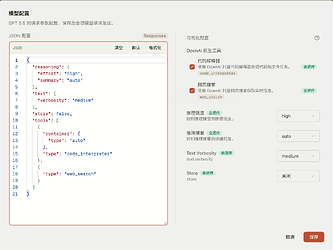
配置JSON内容```
{
"defaultOptions": {
"reasoning": {
"effort": "high",
"summary": "auto"
},
"text": {
"verbosity": "medium"
},
"store": false
},
"optionControls": [
{
"path": "reasoning.effort",
"type": "select",
"label": "Reasoning Effort",
"options": [
"minimal",
"low",
"medium",
"high",
"xhigh"
]
},
{
"path": "reasoning.summary",
"type": "select",
"label": "Reasoning Summary",
"options": [
"auto",
"concise",
"detailed"
]
},
{
"path": "text.verbosity",
"type": "select",
"label": "Text Verbosity",
"options": [
"low",
"medium",
"high"
]
},
{
"path": "store",
"type": "boolean",
"label": "Store"
}
],
"nativeTools": [
{
"key": "openai.code_interpreter",
"protocols": [
"openai_responses"
],
"label": "Code Interpreter",
"enabled": true,
"defaultEnabled": true,
"payload": {
"container": {
"type": "auto"
},
"type": "code_interpreter"
},
"provider": "OpenAI",
"type": "code_interpreter",
"description": "OpenAI hosted code interpreter with an automatic container."
},
{
"key": "openai.web_search",
"protocols": [
"openai_chat_completions",
"openai_responses"
],
"label": "Web Search",
"enabled": true,
"defaultEnabled": true,
"payload": {
"type": "web_search"
},
"provider": "OpenAI",
"type": "web_search",
"description": "OpenAI hosted web search."
}
]
}
```Gemini 系列增加思考、工具调用的配置;用户界面预览如下
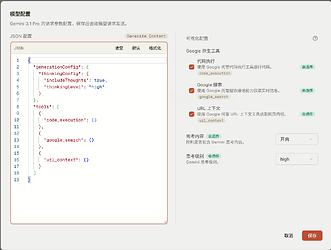
配置JSON内容```
{
"defaultOptions": {
"generationConfig": {
"thinkingConfig": {
"includeThoughts": true,
"thinkingLevel": "high"
}
}
},
"optionControls": [
{
"path": "generationConfig.thinkingConfig.includeThoughts",
"type": "boolean"
},
{
"path": "generationConfig.thinkingConfig.thinkingLevel",
"type": "select",
"label": "Thinking Level",
"options": [
"low",
"medium",
"high"
]
}
],
"nativeTools": [
{
"key": "google.code_execution",
"protocols": [
"google_generate_content",
"gemini_generate_content"
],
"label": "Code Execution",
"enabled": true,
"defaultEnabled": true,
"payload": {
"code_execution": {}
},
"type": "code_execution"
},
{
"key": "google.google_search",
"protocols": [
"google_generate_content",
"gemini_generate_content"
],
"label": "Google Search",
"enabled": true,
"defaultEnabled": true,
"payload": {
"google_search": {}
},
"provider": "Google",
"type": "google_search",
"description": "Google hosted search grounding tool."
},
{
"key": "google.url_context",
"protocols": [
"google_generate_content",
"gemini_generate_content"
],
"label": "URL Context",
"enabled": true,
"defaultEnabled": true,
"payload": {
"url_context": {}
},
"type": "url_context"
}
]
}
```Grok 系列增加工具调用的配置;用户界面预览如下
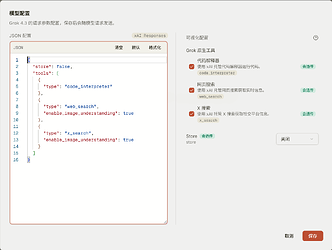
配置JSON内容```
{
"defaultOptions": {
"store": false
},
"optionControls": [
{
"path": "store",
"type": "boolean",
"label": "Store"
}
],
"nativeTools": [
{
"key": "xai.code_interpreter",
"protocols": [
"xai_responses"
],
"label": "Code Interpreter",
"enabled": true,
"defaultEnabled": true,
"payload": {
"type": "code_interpreter"
},
"provider": "xAI",
"type": "code_interpreter",
"description": "xAI hosted code interpreter."
},
{
"key": "xai.web_search",
"protocols": [
"xai_responses"
],
"label": "Web Search",
"enabled": true,
"defaultEnabled": true,
"payload": {
"type": "web_search",
"enable_image_understanding": true
},
"provider": "xAI",
"type": "web_search",
"description": "xAI hosted web search."
},
{
"key": "xai.x_search",
"protocols": [
"xai_responses"
],
"label": "X Search",
"enabled": true,
"defaultEnabled": true,
"payload": {
"type": "x_search",
"enable_image_understanding": true
},
"provider": "xAI",
"type": "x_search",
"description": "xAI hosted X search."
}
]
}主楼 - Chenyme2026-06-09
感谢佬,很好的上手教程~!
- liqi72026-06-09
试用了,页面很炫酷,深度体验没问题就准备从 openwebui 迁移过来
- 春风得意王大帅2026-06-09
感谢佬的教程分享,马上回去部署一个
- 匿名用户2026-06-09
感谢佬分享的配置,刚好部署个试试
- 浅梦2026-06-20
来补一个image2的~
Image2的```
{
"defaultOptions": {
"image_generation": {
"quality": "auto",
"size": "1024x1024"
}
},
"optionControls": [
{
"path": "image_generation.quality",
"type": "select",
"label": "Image Quality",
"options": [
"auto",
"low",
"medium",
"high"
]
},
{
"path": "image_generation.size",
"type": "select",
"label": "图形比例 / 分辨率",
"description": "例如 4K + 16:9 = 3840x2160",
"options": [
"1024x1024",
"1536x1024",
"1024x1536",
"1280x720",
"720x1280",
"1024x768",
"768x1024",
"1280x544",
"2048x2048",
"2160x1440",
"1440x2160",
"2560x1440",
"1440x2560",
"2048x1536",
"1536x2048",
"2560x1088",
"2880x2880",
"3456x2304",
"2304x3456",
"3840x2160",
"2160x3840",
"3200x2400",
"2400x3200",
"3840x1600"
]
}
]
}
```虽然但是,可能不是所有中转站都支持设置这些参数(比如某中转站写着:不支持设置quality参数,size参数 只支持1024x1024 / 1024x1536 / 1536x1024 / auto
官号sub逆出来的是没问题的
- Matsui2026-07-20
感谢佬,一直没找到思考程度的设置,困惑了好久^-^话说 grok 模型不能调整思考程度吗?
- UEFI2026-07-21
- Matsui2026-07-21
收到,感谢!发现默认 JSON 里就有这个字段^-^好使