- Hua2024-03-09
前言
本脚本基于一下两位的脚本基础上 添加了 从0级到1级,1级到2级的显示
注:
- 0级到1级 没测过(因为没找到0级用户)(已测试)
- 2级到3级以及3级 请使用始皇接口来查看 connect.linux.do
感谢
感谢 @_y1 担任1级-2级的显示测试(虽然他自己不知道)
简单摸了一个油猴脚本,请看
[企业微信截图_17097803177607]
规则来自【新人请看】了解Discourse信任度
[image]
因为没办法获取到百天内的统计数据,所以用30天的代替
因为没办法获取到百天内的统计数据,所以用30天的代替
因为没办法获取到百天内的统计数据,所以用30天的代替
不要再吐槽数据不准确了 ^-^
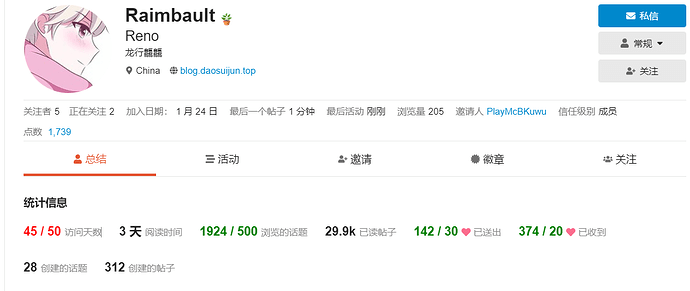
数据来自…OK了,效果:
[image]
// ==UserScript==
// @name Level 3 我来了
// @namespace http://tampermonkey.net/
// @version 2024-03-08
// @description try to take over the world!
// @author we…升级条件
Discourse 论坛信任等级解析
用户信任系统是 Discourse 的基石之一。信任等级的设计旨在:为论坛中新用户设置一个沙盒环境,避免他们在了解论坛操作时不小心伤害到自己或其他用户。
随着时间的推移,为经验丰富的用户赋予更多权限,让他们可以帮助维护和管理他们付出了大量时间建设的社区。
正如《网络社区建设》一书中所提到的,任何社区的参与者都有一个自然的进阶过程。[图片]
这成…脚本
脚本如何使用在这不做阐述
脚本```
// ==UserScript==
// @name Linux do Level
// @namespace http://tampermonkey.net/
// @version 2024-03-08
// @description Tracks progress towards next trust level on linux.do
// @author Hua
// @match https://linux.do/*
// @icon https://www.google.com/s2/favicons?sz=64&domain=linux.do
// @grant window.onurlchange
// @require https://scriptcat.org/lib/513/2.0.0/ElementGetter.js
// ==/UserScript==(function() {
'use strict';async function fetchAboutData() {
try {
let response = await fetch(https://linux.do/about.json, {
"headers": {
"Accept": "application/json",
"User-Agent": "Mozilla/5.0 (Windows NT 10.0; Win64; x64) AppleWebKit/537.36 (KHTML, like Gecko) Chrome/122.0.0.0 Safari/537.36"
},
"method": "GET",
});
if (!response.ok) {
throw new Error(HTTP error! status: ${response.status});
}
return await response.json();
} catch (error) {
console.error("Fetching about data failed: ", error);
}
}// 定义各信任等级的要求
const levelRequirements = {
0: { // 0级到1级的要求
'topics_entered': 5,
'posts_read_count': 30,
'time_read': 60*10,
},
1: { // 1级到2级的要求
'days_visited': 15,
'likes_given': 1,
'likes_received': 1,
'posts_count': 3,
'topics_entered': 20,
'posts_read_count': 100,
'time_read': 60*60,
},
2: { // 2级到3级的要求
'days_visited': 50,
'posts_read_count': 0,
'topics_entered': 0,
'likes_given': 30,
'likes_received': 20,
'posts_count': 10
}
};const updateElements = {
'days_visited': 'li.stats-days-visited > div > span > span',
'likes_given': 'li.stats-likes-given > a > div > span > span',
'likes_received': 'li.stats-likes-received > div > span > span',
'posts_count': 'li.stats-posts-count > a > div > span > span',
'topics_entered': 'li.stats-topics-entered > div > span > span',
'posts_read_count': 'li.stats-posts-read > div > span > span',
'time_read': 'li.stats-time-read > div > span',
}// 从当前URL中解析出用户名
function getUsername() {
return new Promise((resolve, reject) => {
// 创建一个 MutationObserver 实例
const observer = new MutationObserver((mutationsList, observer) => {
// 检查每个 mutation
for (let mutation of mutationsList) {
// 检查是否有添加的节点
for (let node of mutation.addedNodes) {
// 检查节点是否是我们要找的元素
if (node.nodeType === 1 && node.matches('div.username')) {
// 元素找到了,获取用户名并解决 Promise
resolve(node.textContent.replace(/[^a-zA-Z0-9-_]/g, '').toLowerCase());
// 停止观察
observer.disconnect();
return;
}
}
}
});// 配置观察选项
const config = { childList: true, subtree: true };// 开始观察 body 元素
observer.observe(document.body, config);
});
}// 获取当前用户的信任等级和统计数据
function fetchUserData(username) {
return fetch(https://linux.do/u/${username}/summary.json, {
"method": "GET",
}).then(res => res.json());
}// 更新页面上的统计元素以反映当前用户等级的要求
function updateStatsForLevel(user, userSummary) {
const requirements = levelRequirements[user.trust_level];
Object.keys(requirements).forEach(stat => {
elmGetter.get(updateElements[stat]).then(div => {
const currentVal = userSummary[stat];
const targetVal = requirements[stat];
if (stat === 'time_read') {
console.log(currentVal)
console.log(targetVal)
div.innerHTML =${currentVal} / ${targetVal} 秒;
} else {
div.innerHTML =${currentVal} / ${targetVal};
}
div.style.color = parseInt(currentVal) >= parseInt(targetVal) ? "green" : "red";
}).catch(error => {
console.error(Error updating ${stat}:, error);
});
});
}function updateStatsElements() {
getUsername().then(username => {
if (username) {
fetchAboutData().then(data => {
if (data) {
const status = data.about.stats;
// 更新当前用户的统计信息
if (username) {
fetchUserData(username).then(data => {
const userSummary = data.user_summary;
const user = data.users ? data.users[0] : { 'trust_level': 0 };
if (user.trust_level > 2) {
return;
}
levelRequirements[2]['posts_read_count'] = Math.min(parseInt(parseInt(status.posts_30_days) / 4), 20000);
levelRequirements[2]['topics_entered'] = Math.min(parseInt(parseInt(status.topics_30_days) / 4), 500);
updateStatsForLevel(user, userSummary);
}).catch(error => {
console.error("Error fetching user data: ", error);
});
}
}
});
}
}).catch(error => {
console.error('Error getting username:', error);
});
}updateStatsElements();
if (window.onurlchange === null) {
window.addEventListener('urlchange', (info) => {
if (info.url.match(/^https:\/\/linux\.do\/u\/[^\/]+\/summary/)) {
updateStatsElements();
}
});
}})();
主楼 - doomer2026-03-09
直接把代码复制到油猴就行?
- Hua2026-03-09
是的
 赵子龙2026-03-09
来了
- Hua2026-03-09
给我打白工 ^-^
- 恰似你的温柔2026-03-09
实用!感谢分享
- Hua2026-03-09
之前上面的脚本有点问题 现已更改
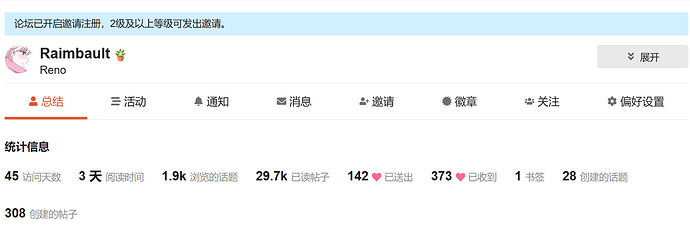
- Reno2026-03-09
- lzgnpl2026-03-09
发布即屎山吗 ^-^
- Hua2026-03-09
- Hua2026-03-09
又不是不能用 ^-^
- 搞七捻三2026-03-09
用上了,不错不错
- ABcopilot2026-03-09
- Hua2026-03-09
你成功测出来bug了
- Hua2026-03-09
已修复
- Reno2026-03-09
- Hua2026-03-09
- Reno2026-03-09
真不行,建议加一个一键直达summary ^-^
- Hua2026-03-09
搞不来 用户名现在是 summary 页面加载完获取的页面的
- Hua2026-03-09
你从新复制一遍 刷新一下试试 我这挺正常的